Sources Panel
Sources Panel
The Sources Panel gives you an overview of all the source files in your document. Open it from Window -> Sources.
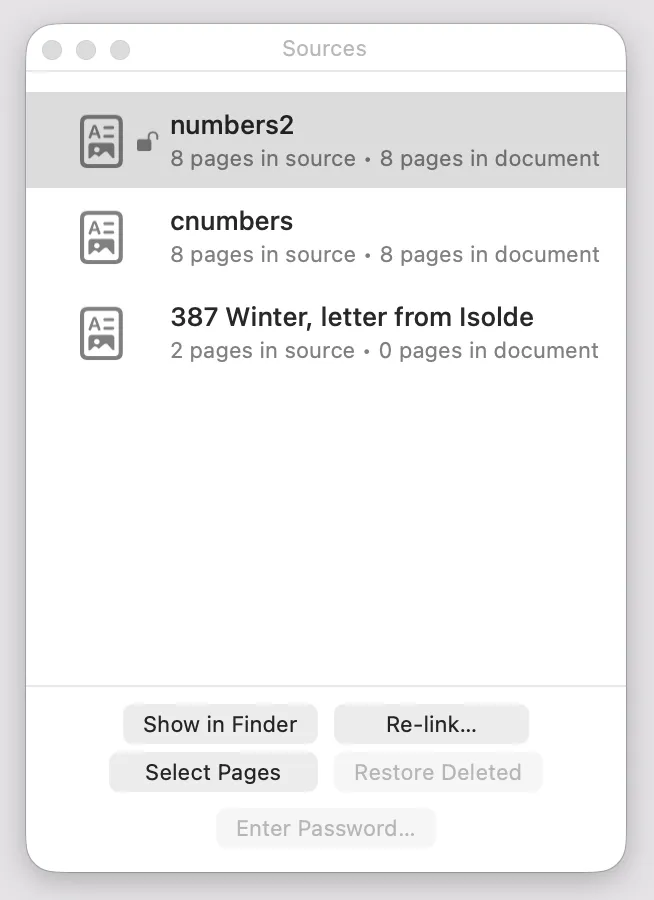
Each source shows its name, how many pages it contains, and how many of those pages are currently in your document. (These numbers can differ if you’ve deleted some pages.) Password-protected sources show a lock icon.
Select a source to use the buttons along the bottom:
- Show in Finder opens the source file’s location on disk.
- Re-link… lets you point Octavo at a new location for the source, if the original file has moved. (See Importing Sources for more on this.)
- Select Pages selects all of this source’s pages in the page strip.
- Restore Deleted brings back any pages from this source that you’ve deleted from the document. Only enabled when there are missing pages to restore.
- Enter Password… lets you enter the password for a locked PDF. Only enabled for password-protected sources that haven’t been unlocked yet.